
WordPress is the world’s most famous platform for creating your own website. It has almost everything you want to create and configure your online shop, blog, e-commerce, and fashion website.
Plugins are the all-time helpers of developers. The WordPress platform has over 50,000 plugins available for users to download and use. In addition, developers are still developing new plugins day by day to ease the use of WordPress.
Choosing the best plugin from the list is a time-consuming task that may take hours of your time. To save your precious time, we have created a list of the top WordPress plugins of 2019.
1. WPForms Lite

The form builder plugin allows you to create beautiful contact forms for your eCommerce shop or blog. The plugin includes free templates and an intuitive drag-and-drop builder. The builder gives you control to type up customer blocks of text within your form and place it where you see fit. WPForms also secure your from the bots by allowing you to create reCAPTCHA and validation boxes so users can access your content with minimal risk of spambots making it on your site. Link your mailing account to receive messages when someone completes one of the forms you’ve placed on your site.
Features
- Drag & Drop Form Builder
- Form Templates
- Responsive Mobile Friendly
- Smart Conditional Logic
- Instant Notifications
- Entry Management
- Payments Made Easy
- Marketing & Subscriptions
- Easy to Embed
- Spam Protection
2. MonsterInsights Lite
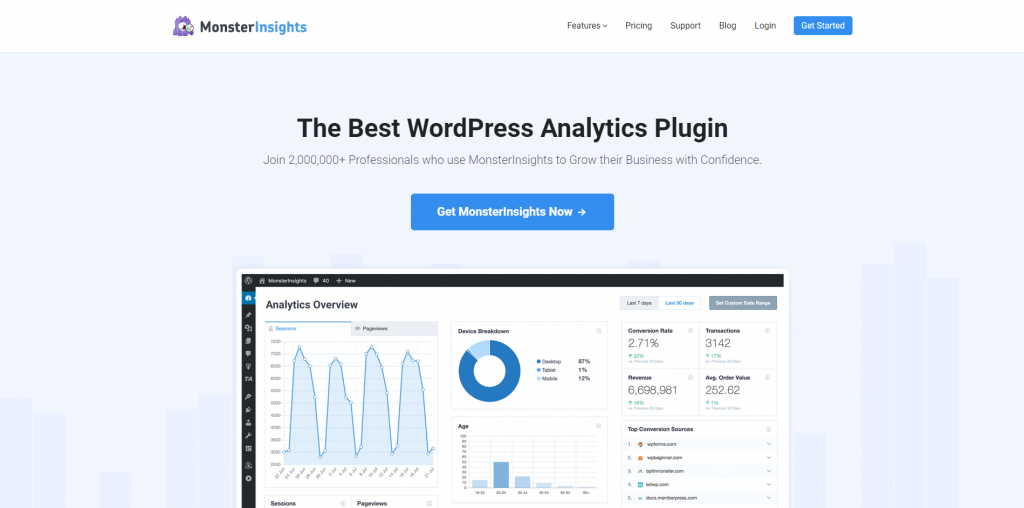
MonsterInsights is a WordPress plugin that lets you track your Google Analytics is extremely important, no matter the type of website you operate. The plugins are the best way to merge your Analytics account directly to your WordPress website. Other than tracking multiple websites, you can get up-to-date data on your page views, bounce rate, source traffic, and more. All you have to do is install MonsterInsights, and after that, you can have access to the site statistics and be able to track all the stats with real-time data.
Features
- Universal Tracking
- Real-time Stats
- Google Analytics Dashboard
- Page-Level Analytics
- EU Compliance (GDPR Friendly)
- Performance & Optimize
- Custom Dimensions
- Enhanced Ecommerce Tracking
- Affiliate Link & Ads Tracking
3. UpdraftPlus

It is always best to take precautions before anything is about to happen. The Updraft Plus does the same for you; it gives you a second chance to restore your website in case of an attack by a hacker, server glitches, or faulty updates. The lifesaver plugins help you to clone your WordPress website and allow you to upload a clone of your WordPress site to their server. If any damage is caused to your website by any means, you can access a previous version of your site, or you can get it directly from their website. The plugins also give you a storage capacity of 100 GB per website, which holds the data of your website. You can also back up the non-WordPress files, even if they are not directly connected to the source.
Features
- Website Backup
- Set schedules For Backup
- Restore Backed Up Website
- Cloning and migration of the website
- Incremental backups
- Rapid Response Support Team
- Backup non-WordPress files and databases
- Security and Lock settings
4. Envira Gallery

The Envira Gallery is the WordPress gallery plugins that provide you with the functionality to create beautiful, responsive photo & video galleries for your website in no time. Create your own customizable photo galleries with their simple drag and drop builder. Moreover, you can also create custom albums, add watermarks, and can even include tags. The plugin feature that amazes all is that it has the option to embed your keywords into each gallery, which helps build your SEO rank. The plugins also support full-length video galleries. Envira Gallery is equipped with pre-built templates to customize the appearance of your gallery. It builds you a fully responsive website that works on mobile, tablet, and desktop devices.
Features
- Gallery Templates
- Albums & Tags
- Drag & Drop Builder
- E-commerce Store
- Social Media Integration
- Watermark & Protection
- Video Support
- Slideshow & Fullscreen
- Fully Responsive & Mobile Friendly
5. ARMember Lite

If you want to lock your premium content behind a paywall and earn recurring revenue (money) from it, ARMember is the best WordPress membership plugin out there. This all-in-one plugin lets you monetize your premium content with flexible payment cycles of weekly, monthly, yearly, and more. The best part is it comes with multiple payment gateways to accept membership fees online. And it doesn’t stop there – You can also create and sell unlimited membership subscription plans, and give your users access to their own member panel. Additionally, it comes with advanced brute force attack protection and Captcha-free spam protection to make sure everything is on guard.
- Unlimited membership plans
- Advanced content restriction
- 21+ payment gateways
- Smart drip content rules
- Online courses
- Drag and drop form builder
- 57+ in-built addons
- Page builder support
- Spam Protection
- Automatic notifications
6. SEMRush

SEMRush is an amazing WordPress plugin that is designed to drive more traffic to your website. The plugins let you research the keywords and tell you exactly where the improvement is needed. Instantly compare the results of your website to your rivals so you can clearly see the type changes you are required to make to ensure that your content reaches a greater audience. After tallying the results, you can also combine them and create easy-to-read reports. Additionally, the plugins give you access to add your branding, access to comment on statistics, and then share that data with your members.
Features
- Technical SEO Audit
- Position Tracking
- Competitive Intelligence
- Competitions Analysis
- Keyword Grouping and Management
- Benchmark Social Performance
- Spot Best Performing Content
- Trending Topic Ideas For Articles
- Content Optimization
- Brand Presence Analysis on Social Media