

Are you a photographer, blogger, or business owner looking for a simple way to showcase your Flickr photos on your WordPress website? Look no further! Flickr Album Gallery Pro is the perfect solution that lets you display beautiful, responsive Flickr galleries with just a few clicks.
In this comprehensive guide, we’ll walk you through everything you need to know about this amazing plugin – from installation to advanced features.
Table of Contents
What is Flickr Album Gallery Pro?

Flickr Album Gallery Pro is a premium WordPress plugin that connects your Flickr account to your website. It automatically fetches your Flickr albums and displays them in a stunning, responsive gallery format.
Why Choose the Flickr Album Gallery Pro Plugin?
Let’s be honest – there are many gallery plugins out there. But here’s why Flickr Album Gallery Pro stands out:
| Feature | Flickr Album Gallery Pro | Other Plugins |
|---|---|---|
| Setup Time | 2 minutes | 15-30 minutes |
| Coding Required | No | Often Yes |
| Hover Effects | 71+ effects | Limited |
| Lightbox Options | 8 types | Usually 1 |
| Mobile Responsive | Yes, automatic | Sometimes |
| Regular Updates | Yes | Varies |
| Support | Priority | Depends on plans |
Getting Started: Installation & Setup
Step 1: Install the Plugin
- Login you your WP Frank account and download the pro plugin zip file
- Upload the `flickr-album-gallery-pro` folder to `/wp-content/plugins/`
- Activate the plugin through the ‘Plugins’ menu in WordPress
- You’ll see a new menu item called “Flickr Gallery Pro” in your dashboard
Step 2: Get Your Flickr API Key
Before you can display your Flickr photos, you need an API key:
- Go to the Flickr API
- Click “Apply for a Non-Commercial Key“
- Fill in the application details
- Copy your API Key
Step 3: Find Your Flickr User ID
Your Flickr User ID is different from your username. Here’s how to find it:
- Go to your Flickr photostream
- Look at the URL – it will show your username
- Use a Flickr ID finder tool or check your Flickr settings
Step 4: Configure Default Settings
Navigate to Flickr Gallery Pro → Default Settings and enter:
– Your Flickr API Key
– Your Flickr User ID
Click Save Settings – and you’re ready to go!
Creating Your First Flickr Album Gallery
Creating a gallery is super simple:
- Go to Flickr Gallery Pro → Add New Gallery
- Give your gallery a title
- The plugin automatically fetches your Flickr albums
- Customize the appearance (we’ll cover this next)
- Copy the shortcode and paste it anywhere on your site

That’s it! Your stunning Flickr gallery is now live.
Detailed Settings Explained
Let’s dive deep into every setting this plugin offers. Understanding these will help you create the perfect gallery for your website.
📸 Album Display Settings
Show Gallery Title
- Yes: Shows the album name above each gallery section
- No: Hides album titles for a cleaner look
Lightbox Styles – You have 8 lightbox options to choose from and set on your output gallery.
Lightbox Caption – If you have added the caption on your Flickr album photos, like title, description, then you can display it as a lightbox preview image.
🎨 Design & Appearance Settings
Gallery Thumbnail Size – Choose how your thumbnails appear:
- Thumbnail – Small, quick loading
- Small Size – Compact view
- Medium 640 – Balanced size
- Medium 800 – Larger previews
- Large 1024 – High-quality thumbnails
- Large 1600 – Best for portfolio sites
- Large 2048 – Maximum quality
- Original Size – Full resolution
Recommendation: Medium 640 or 800 works best for most websites
Number of Columns (Album Gallery Layout) – Control how many images appear in a row:
- 2 Columns – Magazine style
- 3 Columns – Balanced look
- 4 Columns – Gallery style
- 5 Columns – Portfolio style
- 6 Columns – Compact grid
The plugin automatically adjusts columns for mobile devices, no extra configuration needed!
Thumbnail Height – You can set a custom or fixed height on gallery thumbnails to make gallery visuals more appropriate.
🖱️ Hover Effects
This is where the magic happens! Flickr Album Gallery Pro comes with 71 stunning hover effects organized into 4 categories:
1. 2D Transitions (29 Effects)
– Grow, Shrink, Pulse
– Push, Pop, Float
– Rotate, Wobble, Buzz
2. Background Transitions (18 Effects)
These colorful effects use your custom hover color:
– Fade, Sweep Left/Right/Up/Down
– Bounce In/Out, Radial In/Out
– Rectangle In/Out, Shutter In/Out
3. Border Transitions (17 Effects)
Beautiful border animations:
– Border Fade, Hollow, Trim
– Ripple In/Out
– Outline In/Out, Overline From Center
– Underline Effects
4. Shadow and Glow Effects (7 Effects)
Add depth to your images:
– Shadow, Grow Shadow
– Float Shadow, Hover Shadow
– Glow, Box Shadow Inset/Outset
Hover Color & Opacity – Customize the hover overlay color with any color you want, and set the opacity from 0 (transparent) to 1 (solid).
Image Color Overlay – When you hover over an image, a beautiful color overlay appears using your selected color and opacity. This creates a professional, cohesive look across your gallery.
🔲 Lightbox Settings
When visitors click on an image, they can view it in a beautiful lightbox. You have 8 lightbox options:
- Nivobox – Simple and effective style.
- Photobox (Recommended) – Modern design with cool transitions.
- Pretty Photo – Compact and photoframe design.
- Window – Modal style lightbox.
- Smooth – Lightweight lightbox design.
- Swipe – Fullscreen and full-width image lightbox.
- Magnific- Classic, lightweight, and reliable.
- Fancybox – The most popular choice with smooth animations and touch support.
Lightbox Features:
– Thumbnail Navigation: Shows small thumbnails for easy browsing
– Caption Display: Show image titles/descriptions in the lightbox
– Slideshow Autoplay: Automatically cycle through images
⚙️ Advanced Settings
Lazy Loading Speed – Control how fast images load as users scroll. Set a value between 0 and 1000 milliseconds.
Tip: 45-100 works best for most sites
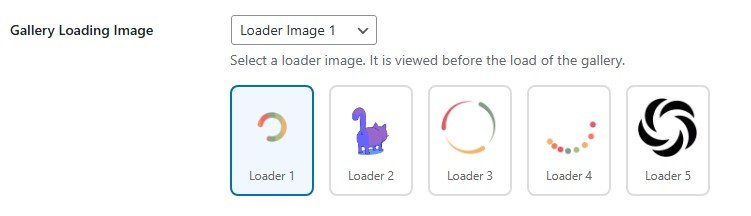
Gallery Loading Icon – Choose from 5 animated loading icons with a visual preview! Click on any icon to select it instantly.
Masonry Layout
– Yes: Creates a Pinterest-style layout where images of different heights align beautifully
– No: Standard grid layout with equal heights
Custom CSS
Add your own CSS code to further customize the gallery’s appearance. Perfect for advanced users who want complete control.
📱 Responsive Design
One of the best features of Flickr Album Gallery Pro is its automatic responsive design. Your galleries look perfect on:
- Desktop computers
- Laptops
- Tablets
- Mobile phones
You don’t need to configure anything – it just works!
How to Use the Shortcode
Once you create a gallery, you get a shortcode like this:[FAGP id=123]
You can paste this shortcode in:
- Posts
- Pages
- Widgets
- Custom page builders (Elementor, Divi, etc.)
Multiple Galleries – Want different galleries on different pages? No problem! Create multiple galleries with different settings; each gets its own unique shortcode.
Real-World Use Cases
Here’s how different people use Flickr Album Gallery Pro:
📷 Photographers – Display your portfolio organized by categories like:
- Weddings
- Portraits
- Landscapes
- Events
🏢 Businesses – Showcase:
- Product photos
- Team events
- Office culture
- Customer testimonials
✈️ Travel Bloggers – Share your adventures:
- Destination galleries
- City guides
- Food photography
- Travel tips visuals
🎨 Artists – Display your work:
- Paintings
- Sculptures
- Digital art
- Work in progress
Why Flickr Album Gallery Pro is Different
Let’s talk about what makes this plugin special:
1. No Coding Required – Everything is point-and-click. You don’t need to touch any code unless you want to.
2. Automatic Sync – Your WordPress gallery automatically updates when you add new photos to Flickr. No manual uploading!
3. Lightning Fast – The plugin is optimized for speed with lazy loading and efficient image delivery.
4. Translation Ready – The plugin supports multiple languages, making it perfect for international websites.
5. Clean Code – Built following WordPress coding standards, ensuring compatibility and security.
6. Regular Updates – We continuously improve the plugin with new features, bug fixes, and security patches.
7. Developer Friendly – Custom CSS support and well-documented code for developers who want to extend functionality.
Troubleshooting Common Issues
Gallery Not Loading?
- Check that your API Key is correct
- Verify yourUser ID
- Make sure your Flickr account is public
Images Loading Slowly?
- Reduce thumbnail size
- Lower the number of albums displayed
- Enable lazy loading
Lightbox Not Working?
- Check for JavaScript conflicts with other plugins
- Try a different lightbox option
- Clear your browser cache
Frequently Asked Questions
Q: Do I need a Flickr Pro account?
A: No! The plugin works with both free and pro Flickr accounts.
Q: Will the gallery slow down my website?
A: No! We use lazy loading and optimized code to ensure fast performance.
Q: Can I customize the colors to match my theme?
A: Absolutely! You can change hover colors, title colors, and add custom CSS.
Q: Is the plugin mobile-friendly?
A: Yes! Galleries are 100% responsive and look great on all devices.
Q: Can I show albums from multiple Flickr accounts?
A: You can create separate galleries for different accounts.
Q: Does it work with page builders?
A: Yes! Use the shortcode in Elementor, Divi, Beaver Builder, and others.
Conclusion
Flickr Album Gallery Pro is the easiest and most feature-rich way to display your Flickr photos on WordPress. With 71+ hover effects, 4 lightbox options, masonry layouts, and complete customization control, your photo galleries will stand out.
Whether you’re a professional photographer, a travel blogger, or a business owner, this plugin makes it simple to create stunning galleries that engage your visitors.
Ready to transform your Flickr galleries? Get Flickr Album Gallery Pro today and start showcasing your photos like never before!