

Are broken links hurting your website’s SEO and user experience? Let me show you how Dead Link Checker Pro can help you find and fix them in minutes.
Why Should You Care About Broken Links?
Let’s be honest. Nobody likes clicking on a link only to see that annoying “404 Page Not Found” error. It’s frustrating for your visitors, and guess what? Search engines don’t like it either.
Here’s what broken links can do to your website:
- Hurt your SEO rankings – Google sees broken links as a sign of poor website maintenance
- Drive visitors away – If people can’t find what they’re looking for, they’ll leave
- Damage your credibility – A website full of dead links looks unprofessional
- Waste your link juice – All those backlinks pointing to broken pages? They’re not helping you anymore
The problem is, finding broken links manually is like looking for a needle in a haystack. If you have hundreds of blog posts, pages, and products, checking each link one by one could take weeks.
That’s where Dead Link Checker Pro comes in.
What is Dead Link Checker Pro?
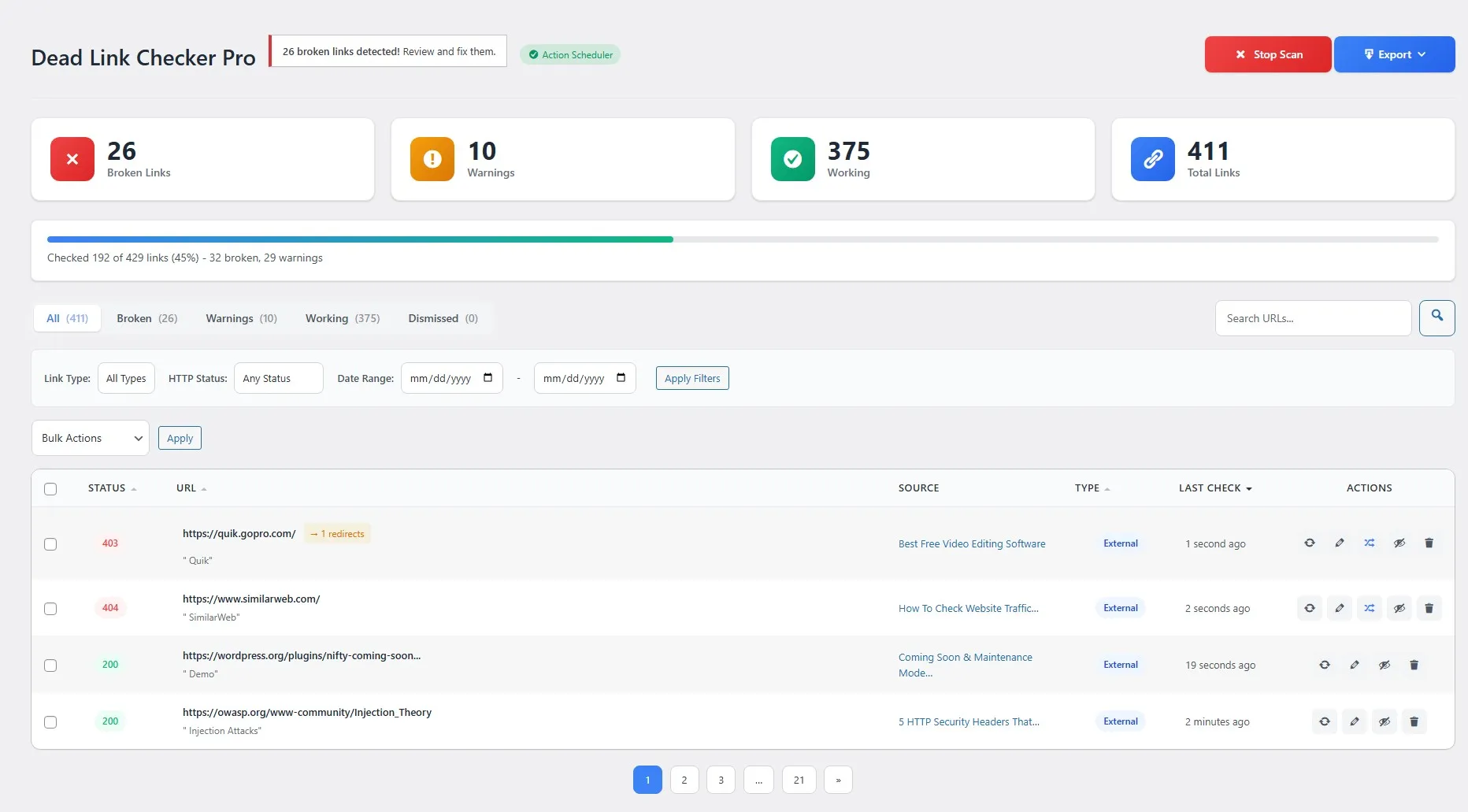
Dead Link Checker Pro is a professional WordPress plugin that automatically scans your entire website, finds all broken links, and helps you fix them quickly. It’s like having a personal assistant who constantly monitors your site for dead links so you don’t have to.
Whether you run a small blog or a large e-commerce site, this plugin works quietly in the background, keeping your links healthy and your SEO intact.
Key Features That Make Dead Link Checker Pro Stand Out
1. Comprehensive Content Scanning
Unlike basic link checkers that only scan posts and pages, Dead Link Checker Pro goes much deeper. It scans:
- Posts and Pages – All your standard WordPress content
- Custom Post Types – WooCommerce products, portfolios, testimonials, you name it
- Navigation Menus – Links in your header and footer menus
- Text Widgets – Sidebar and footer widget links
- Comments – Links that visitors have left in comments
- Custom Fields & ACF – Links stored in Advanced Custom Fields
This means no broken link can hide from you. Every corner of your website gets checked.
2. Full Page Builder Support
Are you using Elementor, Divi, or WPBakery to build your pages? Many link checkers can’t see inside page builder content. Dead Link Checker Pro can.
It works seamlessly with:
- Gutenberg (WordPress Block Editor)
- Elementor
- Divi Builder
- WPBakery Page Builder
So even those fancy custom layouts you’ve built? All the links inside them get checked, too.
3. Multiple Link Types Detection
Dead Link Checker Pro doesn’t just check webpage links. It also checks:
- Internal Links – Links pointing to your own pages
- External Links – Links pointing to other websites
- Images – Broken image links that show as missing images
- YouTube Embeds – Videos that have been deleted or made private
This gives you a complete picture of all the broken resources on your site.
4. Flexible Scan Settings
You’re in control of how the plugin scans your website:
- Scan Frequency – Choose daily, weekly, or monthly scans
- Concurrent Requests – Set how many links to check at once (1-10)
- Request Timeout – Configure how long to wait before marking a link as broken (5-60 seconds)
If you have a busy server, you can slow things down. If you want faster scans, crank up the speed. It’s your choice.
5. Powerful Redirect Manager
Found a broken link? Instead of editing every page where it appears, just set up a redirect. Dead Link Checker Pro includes a built-in redirect manager with:
- 301 Redirects (Permanent) – For links that have moved forever
- 302 Redirects (Temporary) – For temporary moves
- 307 Redirects (Temporary) – Alternative temporary redirect
- Hit Counter – See how many times each redirect is used
- Import/Export – Backup and restore your redirects easily
This is especially useful if you’ve restructured your site or migrated from another platform.
6. Easy-to-Use Dashboard
The dashboard shows you everything at a glance:
- Total links checked
- Number of broken links found
- Links by status (working, broken, redirected)
- Recent scan results
- Quick actions to fix issues
No complicated settings. No confusing interfaces. Just the information you need to keep your site healthy.
7. Quick Fix Options
When you find a broken link, you can:
- View it – See where the link appears and what page it’s on
- Dismiss it – Ignore links you know about (like intentionally broken test links)
- Recheck it – Verify if a link that was broken is now working
- Edit directly – Jump straight to the post editor to fix it
- Bulk actions – Fix multiple links at once
No need to hunt through your content. Everything is just one click away.
8. Export Reports
Need to share your broken link report with a client or your team? Export everything to:
- CSV format – Open in Excel or Google Sheets
- JSON format – For developers and automation
Keep records, generate reports, or import into other tools. The choice is yours.
9. Email Notifications
Don’t want to log in every day to check for broken links? Set up email notifications:
- Get notified when new broken links are found
- Receive weekly or monthly digest reports
- Customize what gets sent and when
Stay informed without lifting a finger.
10. Multisite Support
Running a WordPress multisite network? Dead Link Checker Pro has you covered:
- Works across all sites in your network
- Network dashboard for admins
- Manage everything from one place
Perfect for agencies managing multiple client sites.
How to Use Dead Link Checker Pro (Step-by-Step Guide)
Step 1: Install and Activate
- Upload the plugin to your WordPress site
- Go to Plugins > Installed Plugins
- Click “Activate” next to Dead Link Checker Pro
That’s it. You’re ready to start scanning.
Step 2: Run Your First Scan
- Go to Link Checker in your WordPress admin menu
- Click the “Scan Now” button
- Wait for the scan to complete (time depends on your site size)
The plugin will check every link on your site and report back with the results.
Step 3: Review Broken Links
Once the scan is complete, you’ll see a list of all problematic links:
- The URL that’s broken
- Where it appears (which post or page)
- The HTTP status code (404, 500, timeout, etc.)
- When it was last checked
Step 4: Fix the Issues
For each broken link, you can:
- Edit the post and update the link
- Create a redirect to send visitors to the correct page
- Dismiss the link if it’s not a real issue
Step 5: Set Up Automatic Scans
Go to Settings and configure:
- Scan frequency (daily, weekly, monthly)
- Email notifications
- Domain exclusions (skip certain websites)
Now the plugin will automatically monitor your site and alert you when something breaks.
Why Choose Dead Link Checker Pro Over Other Plugins?
You might be thinking, “There are other link checker plugins out there. Why should I choose this one?”
Great question. Here’s how Dead Link Checker Pro compares:
| Feature | Dead Link Checker Pro | Free Alternatives |
|---|---|---|
| Page Builder Support | ✅ Elementor, Divi, WPBakery, Gutenberg | ❌ Limited or none |
| Custom Post Types | ✅ Full support | ⚠️ Partial |
| Redirect Manager | ✅ Built-in with 301/302/307 | ❌ Requires separate plugin |
| Email Notifications | ✅ Customizable | ⚠️ Basic |
| Export Reports | ✅ CSV & JSON | ❌ Not available |
| Multisite Support | ✅ Full network support | ❌ Single site only |
| Performance | ✅ Optimized, adjustable speed | ⚠️ Can slow down sites |
| Support | ✅ Priority support | ⚠️ Community forums |
The bottom line? Free plugins might work for a basic blog, but if you’re serious about SEO and maintaining a professional website, Dead Link Checker Pro gives you the tools you need without requiring multiple plugins.
Who Should Use Dead Link Checker Pro?
This plugin is perfect for:
- Bloggers who publish content regularly and want to keep old posts updated
- E-commerce store owners who need to ensure product links always work
- Agencies managing multiple client websites
- SEO professionals who need detailed reports and monitoring
- Anyone who cares about user experience and search rankings
If your website has more than a few pages, you need a tool like this.
Real-World Use Cases
Case 1: The Growing Blog
You started a blog 3 years ago. You’ve published 500 posts. Some of those posts link to websites that no longer exist. Some link to your old pages that you’ve since deleted. Dead Link Checker Pro scans everything and shows you exactly what needs fixing.
Case 2: The E-commerce Store
You sell products with affiliate links to Amazon, suppliers, and partners. Products get discontinued. Affiliate programs change. URLs expire. Without checking, you’re sending customers to error pages and losing sales.
Case 3: The Agency
You manage 20 client websites. Each client expects their site to be perfect. Running manual link checks on 20 sites? That would take forever. With multisite support, you can monitor everything from one dashboard.
Privacy and Security
Dead Link Checker Pro respects your privacy:
- No external connections – Only checks links on YOUR site
- No data collection – We don’t track or collect any personal information
- Local storage – All data stays in your WordPress database
- GDPR compliant – No cookies, no tracking, no third-party services
Your data is yours. Period.
Frequently Asked Questions
Q: Will this plugin slow down my website?
A: No. Scans run in the background, and you can control the speed. Visitors won’t notice anything.
Q: How often should I run scans?
A: Weekly is a good starting point for most sites. High-traffic sites with frequent content updates might prefer daily scans.
Q: Can I exclude certain links from being checked?
A: Yes! You can add domain exclusions to skip specific websites that you don’t want to check.
Q: What if a link is temporarily down?
A: You can recheck individual links at any time. If a site was just temporarily offline, you can mark it as okay.
Q: Does it work with my page builder?
A: Yes! It supports Elementor, Divi, WPBakery, and Gutenberg out of the box.
Get Started Today
Broken links are silently hurting your website right now. Every day you wait is another day of lost SEO value, frustrated visitors, and missed opportunities.
Dead Link Checker Pro makes it easy to:
- Find every broken link on your site
- Fix them quickly with built-in tools
- Set up automatic monitoring so you never miss another one
Don’t let broken links damage your reputation. Take control of your website’s health metric today.
Dead Link Checker Pro is developed and maintained by AWP Life. For support, documentation, and updates, visit awplife.com.