

One in five small businesses that publish an email on their own website still list a free email address from Gmail or Hotmail. We counted. Among those that did switch to a custom domain, more than half left the door open for anyone to send email in their name.
Both numbers come from the same check. In September 2026 we collected 2,343 Australian trade and service business websites from Google Maps. In October we looked at the email address each one publishes, then at the DNS records behind it. Creating a business email address takes an afternoon. The part people skip takes ten minutes, and it decides whether your email reaches an inbox.
What an email with your domain name is
An email with your domain name is an email address that ends in the same name as your website. Providers also call it a custom email address or a professional email address. If your website is yourbusiness.com.au, your address is jo@yourbusiness.com.au instead of yourbusiness@gmail.com.
It takes two separate things. The domain is the name, usually your business name, and you rent it yearly from a domain registrar. The email hosting service stores and sends the email, such as Google Workspace, Microsoft 365 or the email included with your web hosting. DNS records connect the two: they tell the rest of the internet which email service handles your domain.
Because of that split, you can change email providers later without changing your address. The address belongs to you, not to the company that stores the email.
What we found on 2,343 small business websites
We built the sample for a different job. It is a list of Australian trade and service businesses that have a Google Maps listing and a website. Electricians, plumbers, painters, mechanics, fencers, landscapers and similar trades make up most of it. For each site we recorded the business email address shown on the site, if there was one.
Only 489 of the 2,343 sites publish an email address at all. The rest rely on a contact form or a phone number. Of those 489, 344 (70%) use an email address on their own custom domain. Another 48 (10%) use a different domain, usually a parent company or an older business name.
That leaves 97 (20%) on a free email service. Gmail alone accounts for 52 of them, followed by Outlook, Hotmail and Bigpond.
Every one of those 97 businesses already pays for a domain. Putting that name on their email takes an afternoon and an email plan from about A$10 a month. If their hosting plan includes email, it costs nothing extra.
The gap is not even across trades. Painters were the worst group in our sample, with 11 of 26 publishing a free email address. Electricians followed with 11 of 31, fencers with 7 of 20, and mechanics with 6 of 24. Plumbers did far better, with 3 of 27. Air conditioning contractors did best, with 1 of 23.
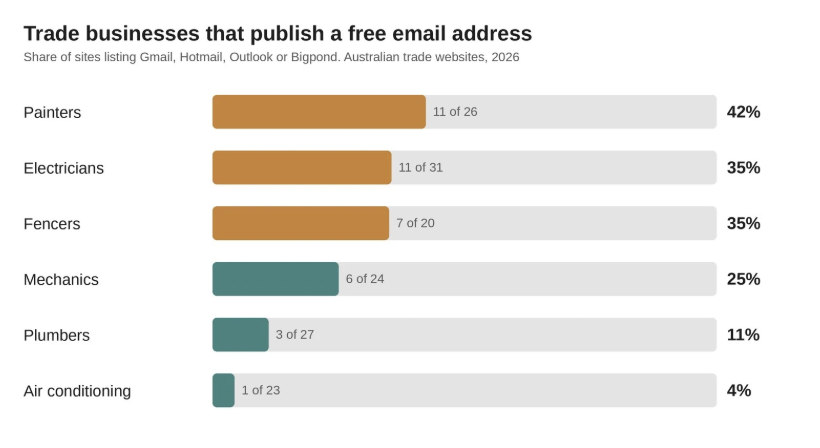
A free email address does not stop a customer from calling. But it does sit next to a quote, an invoice and a bank account number. A customer deciding whether a $9,000 quote is genuine notices when the email domain does not match the website.
Create a business email with your own domain in 4 steps
Whichever email provider you choose, the steps are the same. Only the screens differ.
1. Confirm you control the domain
Log in to the registrar where the domain is registered and check that the registrant is you or your business. If a past web designer registered it in their own name, fix that first. You will need access to the DNS settings in step 3, and you do not want to ask a former supplier for permission every time.
2. Choose an email hosting service
There are three common routes.
- Google Workspace. The Gmail interface on your custom domain email, with calendar and file storage. Business Starter is A$9.90 per user per month on an annual plan in Australia, before tax (Google Workspace pricing page, retrieved 9 October 2026).
- Microsoft 365. Outlook on your own address, a good fit if the office already lives in Word and Excel. Check the current per-user price on Microsoft’s site, because plans and bundles change often.
- Email included with your web hosting. Many hosting plans include email accounts at no extra cost. It works, but spam filtering and support are usually weaker, and moving hosts later means moving email too.
In our sample, Google handled email for 118 of the 344 own-domain businesses and Microsoft for 112. Another 103 used hosting email or smaller email providers, and 11 had no mail record at all. All three routes are legitimate. Pick the one your team will open on their phones.
3. Point your domain at the email service
Your provider gives you a set of MX records. MX stands for mail exchanger, and it tells other mail servers where to deliver email for your domain. You add these records in the DNS settings at your registrar or host, then remove any old MX records.
Most providers check the records for you and show a green tick within an hour. Some changes take up to 48 hours to spread, so do this on a quiet day.
4. Create the email accounts
Start with one email account per person who needs one, plus shared addresses such as enquiries@ or accounts@. Shared addresses work well as an email alias or a group that delivers to real people. Multiple email accounts cost money; aliases usually do not. That way nothing sits unread in a mailbox nobody logs in to.
The 3 DNS records that decide whether your mail lands
Setting up the email account gets email in. These three records decide whether your outgoing email gets out, and whether someone else can pretend to be you.
SPF is a list of the servers allowed to send email for your domain. When a receiving server gets a message from you, it checks the list. A message from a server that is not on it looks suspicious.
DKIM adds a digital signature to every message you send. The receiver checks the signature against a public key in your DNS. If the message was altered on the way, or never came from you, the signature fails.
DMARC tells receivers what to do when SPF or DKIM fails, and sends you reports about it. It has three settings. p=none means “deliver anyway and tell me”. p=quarantine means “send it to spam”. p=reject means “refuse it”.
Since February 2024, Gmail has required every sender to set up SPF or DKIM. Anyone sending 5,000 or more messages a day to Gmail accounts needs all three: SPF, DKIM and DMARC. For them, DMARC at p=none is enough (Google, Email sender guidelines, retrieved 9 October 2026). A small business rarely sends 5,000 a day. But a newsletter tool, a booking system and an invoicing app all send as your domain, and receivers judge them by the same records.
On a WordPress site that list is longer than most owners expect. Every time someone submits a contact or lead form, WordPress sends a notification through your domain, and a newsletter plugin does the same on every campaign. By default WordPress hands that mail to your web host to deliver, so if the domain’s SPF or DKIM records are missing, form confirmations and password resets land in spam or disappear — and the visitor assumes you never replied.
What the 344 own-domain businesses had in place
We looked up the SPF and DMARC records for all 344 domains on 9 October 2026. We expected the Gmail count to be the story. It wasn’t.
- 58 (17%) had no SPF record. Any server can claim to send their email, and receivers have nothing to check it against.
- 194 (56%) had no DMARC record. Nobody tells receivers what to do with a message that fails, and the owner never hears about it.
- 114 (33%) had DMARC at
p=none. That is the right first step, but it only reports. It stops nothing. - 36 (10%) enforced DMARC with quarantine or reject.
Only those last 36 would see a forged message from their domain blocked.
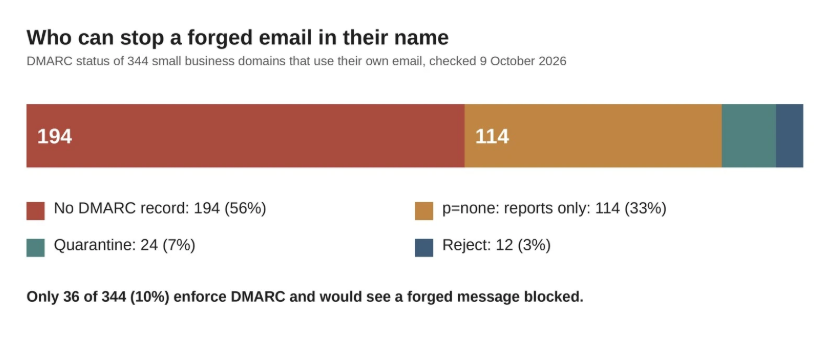
So nine in ten of these businesses would not stop an invoice sent in their name from a server they have never heard of. Customers of trades often pay deposits by bank transfer. Payment redirection scams, where a forged email announces new bank details, rely on exactly this gap. It is the same class of problem as any other gap in a small business’s web security: the basics get skipped, and the loss lands later.
Moving off a free email address without losing enquiries
The new address does nothing if customers keep writing to the old one. Move in this order.
- Forward the old mailbox to the new one. Keep the old address alive and forwarding for at least a year. Repeat customers and old invoices will keep using it.
- Change the address everywhere a customer finds you. Start with the website and your Google Business Profile. Then Facebook, directory listings, quote and invoice templates, and your signature.
- Update the logins. Your bank, accounting software, suppliers and the domain registrar itself should all point to the new address. Leaving the registrar on an old free mailbox is how businesses lose their domain when that mailbox is closed.
- Reply from the new address only. Set your phone’s mail app to reply from the domain address, even when a message arrives through the forward.
Check your own domain in 2 minutes
You do not need to log in anywhere to see what the rest of the internet sees. Free lookup tools such as MXToolbox or Google Admin Toolbox show all three records when you type in your domain. On a computer, the command line works too:
nslookup -type=mx yourbusiness.com
nslookup -type=txt yourbusiness.com
nslookup -type=txt _dmarc.yourbusiness.com
Read the answers like this:
- The MX record should name your mail provider, such as google.com or outlook.com. If it names a provider you left years ago, your email may be going somewhere you cannot see.
- The TXT record starting with
v=spf1should list every service that sends as you. If your newsletter tool or invoicing app is missing, its email is more likely to land in spam. - The
_dmarcrecord should exist. If it does not, add one atp=nonewith a reporting address. Once a few weeks of reports show your real senders passing, move it top=quarantine.
Each of these is a free change in your DNS settings. Your email provider’s help pages give the exact values to paste.
Frequently asked questions
Can I get an email with my domain name for free?
Sometimes. Many hosting plans include email accounts, and some domain registrars offer free forwarding to an existing inbox. Forwarding receives email but usually cannot send as your domain properly, so replies still show your Gmail address. A paid email plan avoids that, and most offer a free trial first.
Do I need web hosting to have email on my domain?
No. Email hosting and web hosting are separate services that share the domain. You can run email on Google Workspace or Microsoft 365 with no website at all. You can also keep the site on one host and the email with another.
Will setting up DMARC stop my own emails from arriving?
Not atp=none, which only reports and changes nothing about delivery. The risk comes later, when you move to quarantine or reject before every legitimate sender is listed in SPF or signing with DKIM. Read the reports first, then tighten.
How long does the whole setup take?
For one person on Google Workspace or Microsoft 365, about an afternoon, including the DNS records. DNS changes can take up to 48 hours to take effect everywhere, so allow two days before you announce the new address.
Where to start this week
If you already own a domain name, start with the email account. Add SPF and DKIM the same day, while you are already in the DNS settings. Publish DMARC atp=none, put a reminder in the calendar for a month out, and tighten it once the reports look clean. On our numbers, that alone puts a business ahead of nine in ten of the ones we checked.
Vasilii Aldukhov runs Web Ways Tech, a Sydney web studio that builds and maintains websites for Australian trades, NDIS providers and childcare centres. The figures in this article come from the studio’s own review of 2,343 business websites in September and October 2026.
Leave a Reply