

If you run a WordPress blog or manage a business website, you already know how important SEO is. Without proper SEO, even the best content won’t rank on Google — and that means zero organic traffic.
The real question is: which SEO plugin should you use? The market is packed with options — Yoast, Rank Math, All in One SEO, and dozens more. But today, we’re going to talk about a plugin that takes a genuinely different approach — DefiniteSEO.
In this review, we’ll explore the DefiniteSEO WordPress SEO plugin from top to bottom — every feature, every setting, the pros, the cons, and our honest opinion on how it stacks up against the competition.
What Is DefiniteSEO?
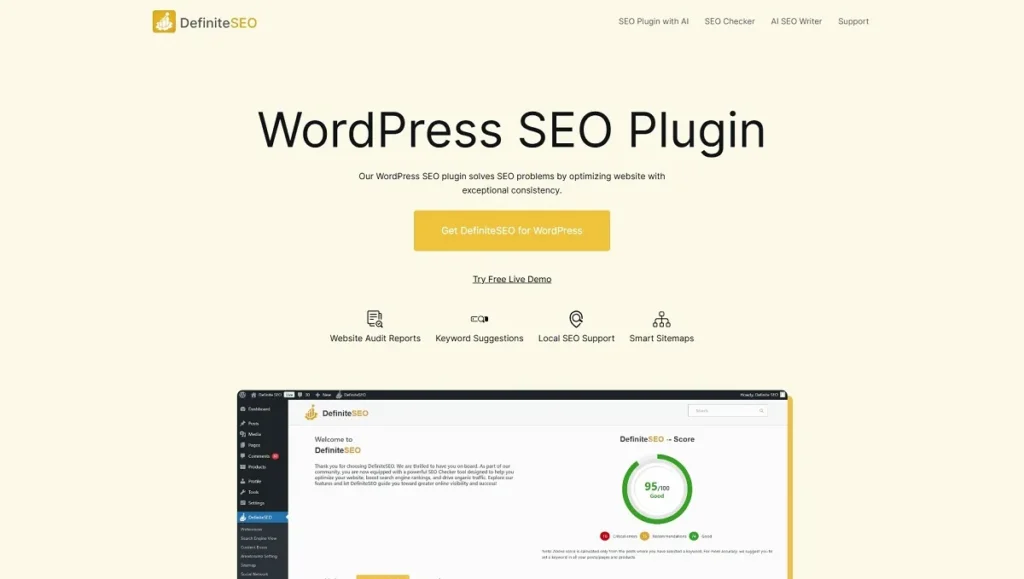
DefiniteSEO is an AI-powered WordPress SEO plugin designed to find and fix SEO problems on your website. But it’s not just a plugin, it’s a complete SEO tools suite that includes three core products:
- WordPress SEO Plugin — Install it directly inside your WordPress dashboard
- Free AI SEO Checker — Run an instant SEO audit on any website with 190+ checks (no signup required)
- AI SEO Writer — Generate publish-ready, SEO-optimized articles using AI
The plugin has been in active development since 2018, which means this is a mature, well-tested product — not some overnight creation. It’s built by Param Chahal and the DefiniteSEO team.
Key Highlights at a Glance
Before we dive into the details, here’s a quick snapshot of what DefiniteSEO brings to the table:
- 50,000+ SEO Audits completed to date
- 190+ SEO Checks per audit
- 10+ Years of continuous development
- 3+ AI Tools on a single platform
- Free version available on WordPress.org
- Pro version available with advanced features
Complete Feature Breakdown
1. Setup Wizard — Get Started in Minutes
When you first install the plugin, a step-by-step setup wizard walks you through the entire configuration process. It:
- Checks your website’s current configuration
- Suggests optimal SEO settings tailored to your site
- Helps you set up social profiles
- Configures the Webmaster Tool verifications
This is incredibly helpful for beginners who often feel overwhelmed by SEO settings. While Yoast and Rank Math also offer setup wizards, DefiniteSEO’s wizard specifically recommends the best settings based on your site’s unique configuration.
2. Automated Website Audit Reports
This is one of the features that impressed us the most. DefiniteSEO automatically audits your website’s SEO health and sends the reports straight to your email inbox.
You can choose:
- Daily, weekly, or monthly report frequency
- Send reports to your WP Admin email or any custom email address
- Get detailed insights into SEO issues and on-page improvement opportunities
Neither Yoast nor Rank Math offers this kind of automated email audit report system. It’s a genuinely proactive approach to SEO management that saves time and keeps you informed without lifting a finger.
3. Keyword Density Optimization — The Plugin Tells YOU the Keywords
This is a standout feature that sets DefiniteSEO apart from every other SEO plugin we’ve tested.
How other plugins work: You manually enter a focus keyword, and the plugin checks whether you’ve used it enough.
How DefiniteSEO works: The plugin automatically analyzes your content and tells you what your focus keyword should be. You don’t need to guess or research — the plugin figures it out for you.
Along with keyword suggestions, it provides a complete content analysis:
- Total word count
- Sentence count
- Stopword count
- Difficult word identification
- Average words per sentence
This gives you a full “health report” of your content in one place.
4. Search Engine Preview (SERP Preview)
When you write a post, you want to know exactly how it will look in Google’s search results. DefiniteSEO includes a built-in SERP preview that lets you:
- Customize your meta title
- Edit your meta description
- See a real-time preview of your Google listing
This is a standard feature that every SEO plugin should have, and DefiniteSEO implements it cleanly.
5. Social Media Optimization
When your content gets shared on Facebook, LinkedIn, or Twitter, you want it to look good. DefiniteSEO gives you dedicated controls for:
- Open Graph tags (for Facebook, LinkedIn, and other platforms)
- Twitter Card settings
- Custom titles and descriptions for social sharing
- Responsive previews for both desktop and mobile — a nice touch
6. Structured Data — Schema Markup
Schema markup helps search engines understand the context of your content. DefiniteSEO supports multiple schema types:
- Article Schema
- Person Schema
- Organization Schema
- WebSite Schema
- WebPage Schema
- BreadcrumbList Schema
- ImageObject Schema
All schemas are implemented using JSON-LD format, which is Google’s recommended approach.
Worth noting: Advanced schema types like FAQ, How-To, Product, and Recipe Schema aren’t explicitly mentioned on the plugin’s website. If you need those, it’s worth checking with the developer.
7. Built-In Spelling & Grammar Checker — The Biggest Differentiator
This is the feature that truly sets DefiniteSEO apart from every competitor.
Yoast doesn’t have it. Rank Math doesn’t have it. All-in-One SEO doesn’t have it.
DefiniteSEO includes a built-in spelling and grammar checker that:
- Highlights misspelled words
- Identifies grammatical mistakes
- Suggests correct spellings
- Recommends corrected sentences
This means you don’t need a separate tool like Grammarly for basic content quality checks. It’s built right into the plugin.
8. Website Link Monitor — Your Broken Link Detective
Broken links are terrible for SEO and user experience. DefiniteSEO includes a built-in link monitoring system that:
- Detects broken links
- Tracks internal links
- Monitors external links
- Identifies redirect links
- Catches 404 errors
- Provides a health rating for each link
- Shows detailed redirection behavior insights
This eliminates the need for a separate “Broken Link Checker” plugin. One plugin handles everything.
9. Local SEO Settings
If you run a local business, DefiniteSEO has you covered:
- Specify your business type
- Configure Google Maps integration
- Optimize for location-specific search queries
- Boost your local search presence
10. Smart Sitemaps — XML, News, and Video
DefiniteSEO offers three types of sitemaps:
XML Sitemap:
- Automatically generated and updated when new content is published
- Ensures efficient search engine crawling
News Sitemap:
- Dedicated sitemap for news articles
- Add your Google News publication name
- Include or exclude specific posts and pages
- Designed for prompt indexing of time-sensitive content
Video Sitemap:
- Separate sitemap for video content
- Include or exclude specific videos
- Improve video content visibility in search results
Important comparison: In Yoast, News and Video Sitemaps are only available in the Premium version. In Rank Math, they’re Pro-only features. DefiniteSEO offers them as part of its feature set.
11. Smart Redirect Manager
Changed a URL? Deleted a page? DefiniteSEO’s Redirect Manager handles it all:
- 301 — Permanent Redirect (passes full SEO value)
- 302 — Temporary Redirect
- 307 — Temporary Redirect (preserves HTTP method)
- 410 — Gone (content permanently removed)
- 451 — Legal Reasons (content blocked due to legal issues)
While 301 and 302 are common, 410 and 451 support is rare in SEO plugins. This is advanced-level redirect management that most competitors miss.
12. Content Performance Score
DefiniteSEO assigns every article a score out of 100 based on:
- Keyword usage
- Meta tag quality
- Content readability
- Link structure
- And more
The score comes with clear indicators of what’s working well and what needs improvement — making optimization straightforward.
13. External Link Management
Controlling outbound links is crucial for maintaining SEO integrity. DefiniteSEO allows you to:
- Set external links as nofollow or follow
- Exclude specific domains from nofollow rules
- Prevent link equity from flowing to low-quality or spammy sites
14. Additional Features
- Breadcrumb Settings — Customize and configure breadcrumb navigation
- WooCommerce SEO — Optimize product pages for search engines
- Website Verification — One-click verification for Google Search Console, Bing, Baidu, Yandex, Pinterest, and more
- Robots.txt Settings — Control how search engines crawl your site
- SEO Points to Improve — Organized action list: Critical Issues, Recommended, and Good
How Effective Is DefiniteSEO for SEO? — A Technical Assessment
We analyzed the plugin’s own website (definiteseo.com) to see how well the developers practice what they preach. Here’s what we found:
| Technical Check | Status |
|---|---|
| Meta Title & Description | Properly optimized |
| Canonical URL | Correctly set |
| Robots Meta | index, followed by max-snippet:-1 |
| Open Graph Tags | Complete set implemented |
| Twitter Card Tags | Properly configured |
| Schema Markup (JSON-LD) | Multiple schema types (Person, Organization, Website, WebPage, BreadcrumbList, Article) |
| Heading Structure | Clean H1 → H2 → H3 hierarchy |
| Mobile Responsive | Fully responsive design |
| Page Performance | Lightweight Astra theme used |
The developers clearly use their own product — and it shows. The technical implementation on their site is solid, which is always a positive sign when evaluating a plugin.
Pros of DefiniteSEO
- Built-in Spelling & Grammar Checker — A unique feature not found in any other major SEO plugin
- Automatic Keyword Suggestion — The plugin identifies your keywords instead of asking you to set them manually
- Website Link Monitor — Broken links, redirects, and 404 errors tracked in one place
- News & Video Sitemaps — Features that are premium-only in Yoast and Rank Math
- Automated Email Audit Reports — Daily, weekly, or monthly reports delivered to your inbox
- Comprehensive Redirect Manager — Supports 301, 302, 307, 410, and 451 redirects
- Content Performance Score — A clear 100-point scoring system for every article
- External Link Management — Nofollow/follow control with domain-level exclusions
- 10+ Years of Development — A mature, stable product with a proven track record
- Free AI SEO Checker — Audit any website for free with no signup required
Cons of DefiniteSEO
- Smaller community — Compared to Yoast and Rank Math, the user base and community support are still growing
- Schema types appear limited — No explicit mention of FAQ, How-To, Product, or Recipe schema
- Demo site has Cloudflare captcha — Trying the live demo can be slightly inconvenient
- Documentation could be more detailed — Comprehensive guides and tutorials would help new users
- Pricing isn’t immediately clear — The website could do a better job of presenting pricing plans
Who Should Use DefiniteSEO?
DefiniteSEO is a great fit if you:
- Run a WordPress blog or business website
- Want a simple yet powerful SEO solution
- Need a built-in spelling and grammar checker
- Want automated broken link monitoring
- Run a news or video-focused website
- Need Local SEO for a brick-and-mortar business
- Want premium-level features without paying premium prices
It might not be the best fit if you:
- Need highly advanced schema types (FAQ, How-To, Recipe, etc.)
- Prefer a plugin with a massive community and extensive third-party documentation
- Are already happy with Yoast Premium or Rank Math Pro
Final Verdict
DefiniteSEO is an underrated WordPress SEO plugin that packs several features you simply won’t find in the market leaders. The built-in spelling checker, automatic keyword suggestions, link monitoring, and automated email audit reports genuinely differentiate it from the competition.
If you’re tired of the same old Yoast or Rank Math experience, or if you’re looking for a fresh, feature-rich alternative that offers premium-level functionality, DefiniteSEO is definitely worth a try.